私のウェブサイトへようこそ

BeliEve in feelinG of aFFinity ! LOOkin for a Person thAt comfOrt of knOwinG. I cAn alwAys be mysEl wt her. sHe'LL accEpT mE for bEing jUst thAt !.

With heR, i nv hv tO laUgh whEn i fEeL like cRyin, Or b qUiet whEn i nEed tO talk, or staY calm whEn i fEeL like geTtinG upset,or sOund pOsitiVe whEn i neeD to cOmplain.....

Sunday, February 27, 2011

全台首座數位IMAX表現亮眼,威秀影城與IMAX再簽約,五年內六座數位IMAX進駐全省威秀。


全台灣最大的影城業者,再次震撼電影市場
IMAX集團(NASDAQ:IMAX;TSX;IMX)和台灣電影界龍頭威秀影城繼今年四月首次合作,成功打造台北日新威秀數位IMAX影城後,今天宣布未來合作計畫—威秀影城將在全台引進六座數位IMAX播映系統,預計於2014年完工。


台北日新威秀數位IMAX影城自四月初開幕以來,票房穩健成長,【怪獸大戰外星人】、【星際爭霸戰】屢創佳績,六月底上映的【變形金剛:復仇之戰】票房獨霸全台,上映首週創下五百七十萬票房,目前累積票房已突破兩千三百萬。日新威秀數位IMAX影城成為【變形金剛:復仇之戰】全台票房收入最高的影城。

IMAX集團與大陸華誼兄弟傳媒公司日前宣佈合作,將在中國及亞洲其他地區的IMAX戲院播映華語電影;IMAX集團又與威秀影城簽下在台加設六座數位IMAX影城的合約;預計在2012年前,亞洲將有77座IMAX影城。IMAX集團目前在全世界已簽定220座數位IMAX影城合約,其中有超過100座數位IMAX影城開始營運。


威秀影城董事長王超立表示:「台北的電影觀眾非常喜愛IMAX的觀影經驗,日新威秀的表現超越了我們的期待。我們相信設立更多的IMAX影城有助於提升威秀影城的形象,加上未來華語電影也將推出IMAX版本,IMAX的市場潛力無窮。」

IMAX總裁查傑爾方(Richard L. Gelfond)說:「威秀影城成功地將IMAX的觀影經驗介紹給台北的觀眾。威秀影城首次引進IMAX,就創下如此優秀的成績,我們非常樂見。威秀在台灣追加六座IMAX影城的決定以及他們對IMAX的熱忱,有助於IMAX在亞洲地區的推廣。」
IMAX開發部執行副總裁賴瑞歐萊利(Larry O’Reilly)補充道:「我們的數位投影技術帶領威秀影城快速成為台灣IMAX電影的先驅,我們非常興奮在短時間內又能與威秀再度合作。這次的合作增加了我們在亞洲發展的機會。我們對於能獲得像威秀這樣的知名的影城的支持,感到非常高興。」


IMAX革新數位投影系統,提供了IMAX觀影經驗,也為片商、電影發行商和IMAX影城帶來了更大的利潤,此後不必再準備厚重的電影拷貝,放映片單的調度彈性更大,可以放映的IMAX電影數量增加。這套數位系統可以播放IMAX電影,也可以播放IMAX 3D立體電影。

關於威秀影城
1998年,全台第一座專為放映電影而量身打造的威秀影城在台北市信義區登場,嶄新多元化的設備及規劃,提供了傳統電影院沒有的舒適視聽空間,並寫下複合式影城的新里程碑。威秀影城目前全台灣經營版圖涵蓋台北、新竹、台中、台南、高雄5個區域,共開設7家影城,下一個計畫是預計於2009年第四季在台北車站五鐵共構處開設全省第8家京站威秀影城;接下來預計於2011年在台北縣板橋新板特區開設板橋遠百威秀影城。威秀影城以不凡的視野和企圖心,將帶領台灣電影娛樂事業邁向另一座高峰!

威秀影城官網 : http://www.vscinemas.com.tw/

關於IMAX集團
IMAX集團是世界頂尖的娛樂科技公司之一,專攻具有身歷其境臨場效果的電影科技。全球的IMAX 網絡是好萊塢電影在世界各地最重要、也最成功的電影經銷平台,擁有IMAX電影院,利用專利的IMAX、IMAX 3D和IMAX DMR科技,提供最佳的電影觀賞效果和環境。IMAX DMR是該公司的創新數位重製科技,可以將幾乎所有的傳統電影數位化,轉變成IMAX體驗的絕佳影像和聲音效果。IMAX知名的投影系統,能在全球最大的螢幕上播放高清晰度的畫面,IMAX這個品牌也在世界各地,和獨一無二、身歷其境的娛樂劃上等號,提供消費者最佳的觀影經驗。截至2008年9月30日為止,在全世界42個國家共有320家IMAX電影院正在營運中。

IMAXR, IMAXR 3D, IMAX DMRR, IMAX MPXR, and The IMAX ExperienceR 為IMAX集團的註冊商標。欲知該公司的相關詳情請上網查詢:http://www.imax.com/

Thursday, February 24, 2011

How to get Whatsapp work in your iPad/iPod Touch


This morning I’m planning to buy an iPod touch 4G as a valentine gift for my wife. Half way doing the check out process from Apple online store (Malaysia), I noticed from some forum saying that Whatsapp is stop working for iPod touch and iPad since version 2.5.7 onward! Because the developer want to restrict it. While that caused me to changed my decision not to complete the online order, and do some testing and research first.

After installed Whatsapp to iPad, i got an error message like this in, which is not surprise since last time already stop working:


And checking from several forum and their official Facebook discussion page, Seems like this is well known. Some said probably change to other app but everyone are using Whatsapp in my network, i’m not going to use Ping or TextPlus anyway! Even it is free, KaKaoTalk also not many people using it!

I decided to hack the app/device to get it work, and i managed to get it working on my iPad:


It need some tweak to get it work.

* Please note the method that i provided here just to help those who want to get their Paid Apps working on their iOS devices, my Whatsapp is paid and all i want is to get my Paid App work for all of my iOS device. Not restricted to what Developer tell me what to do.

Whatsapp team, got it? Your Whatsapp is cool, but restricted it for iPhone only is NOT COOL!

What you need?
Jailbroke iPad/iPod Touch with SSH access, or you can use iFile from Cydia
Whatsapp version 2.5.3, if you do not have this, you may need to find it somewhere.
Extra phone number, better with the number you didn’t activate it for Whatsapp on other device.
Optional – “Property List Editor” from mac to Edit the .plist file, but it may not necessary.
Step 1. Install Whatsapp version 2.5.3, activate it with your other mobile phone number that you going to use in your iPad/iPod touch for Whatsapp. First time setup you will prompt to allow Push notification, tap yes. And insert your mobile number to activate. After that you will received an error message said “Your device is failed to authorized, would you like to retry the authorizaion…” ignore and close the app.

Step 2. Upgrade your Whatsapp via iTunes from your PC/Mac to the latest version and sync it with your iPad/iPod touch.

Step 3. Open the Whatsapp again, you should see it is connected and working. If you still receive the error message like this:


Now open iFile (Search and install from Cydia), goto:

* PLEASE NOTE EDITING THIS FILE MAY CAUSE YOUR DEVICE FAILED TO REBOOT, YOU BETTER KEEP A COPY TO RESTORE LATER OR DO A BACKUP BEFORE YOU APPLY THIS HACK, IT IS NOT OUR RESPONSIBILITY IF YOUR DEVICE FAILED TO BOOT INTO THE HOME SCREEN.

/System/Library/CoreServices/SpringBoard.app

Look for K48AP.plist (iPad) or N72AP.plist (iPod touch), tap and open it with “Property List Viewer”. Tap “Edit”

Under capabilities area, add these codes after the last line, just before the :


Save the file, respring your device, if you do not know how to respring, reboot then.

Open your Whatsapp, and it should be working now.

Actually at first i thought this is not necessary, but it seems like you need these codes to cheat the Whatsapp assume your device is Smartphone, not just iPad/iPod touch. As “telephony” checking is required for Whatsapp to work in version 2.6 onward.

Good luck. My wife going to chat with her buddy from 9-6 daily i guess.


Read more: http://henstudio.com/apple/2011/02/10/how-to-get-whatsapp-work-in-your-ipadipod-touch/#ixzz1ErSaJoS6

Source: http://henstudio.com/apple/2011/02/10/how-to-get-whatsapp-work-in-your-ipadipod-touch/

Tuesday, February 22, 2011

Internet Protocol Suite

Internet Protocol Suite
1. Application Layer
BGP · DHCP · DNS · FTP · HTTP · IMAP · IRC · LDAP · MGCP · NNTP · NTP · POP · RIP · RPC · RTP · SIP · SMTP · SNMP · SSH · Telnet · TLS/SSL · XMPP ·

2. Transport Layer
TCP · UDP · DCCP · SCTP · RSVP · ECN ·

3. Internet Layer
IP (IPv4, IPv6) · ICMP · ICMPv6 · IGMP · IPsec ·

4. Link Layer
ARP/InARP · NDP · OSPF · Tunnels (L2TP) · PPP · Media Access Control (Ethernet, DSL, ISDN, FDDI) · (more)

How do you create an .ipa file?

To make a IPA the easy way...........

Step 1. download winrar or winzip and install it
Step 2. download any IPA
Step 3. right click on your IPA and select properties
Step 4. change the (open with program) to winrar-winzip click ok
Step 5. dbl click your IPA
Step 6. delete artwork and replace with yours
Step 7. delete folder payload and replace with yours
Step 8. close IPA and change the open with program back to itunes
Step 9. rename your IPA the title of the program your installing - done

Source: http://www.hackint0sh.org/f151/50960.htm

Sunday, February 20, 2011

【iPhone】JB之後一定要嘗試的:WeatherIcon

話說~上禮拜幫學弟JB後 就順手幫他弄了一些東西

因為他的iPhone有無限上網 所以就幫他來安裝一個好玩得東西~WeatherIcon

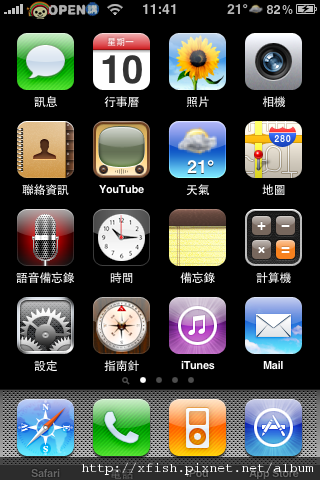
這是什麼東西勒 先看一下下圖 有沒有發現哪裡不對呢?!


有沒有發現右上角有溫度跟圖案顯示

這就是本次要為大家介紹的WeatherIcon

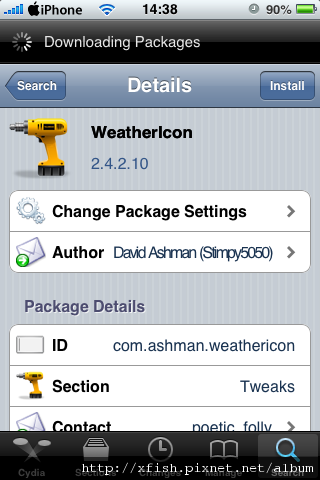
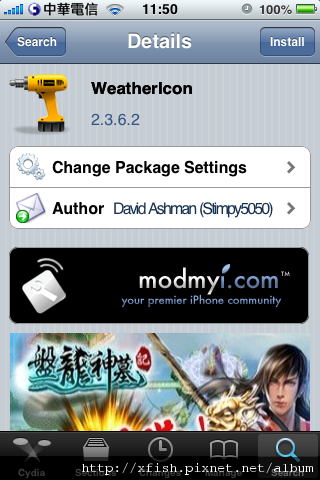
首先呢 先去Cydia搜尋WeatherIcon 然後安裝


(11/2更新)


今天幫同事安裝 已經更新到2.4.2.10版本了


安裝完之後 一樣按照之前的方式

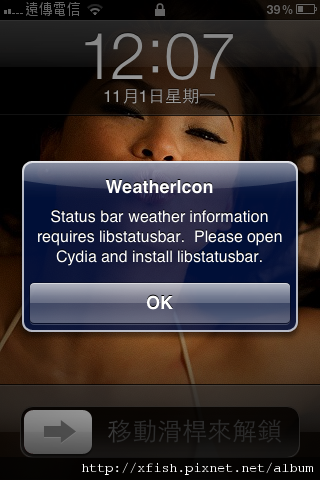
將Status Bar的設定打開 respring後

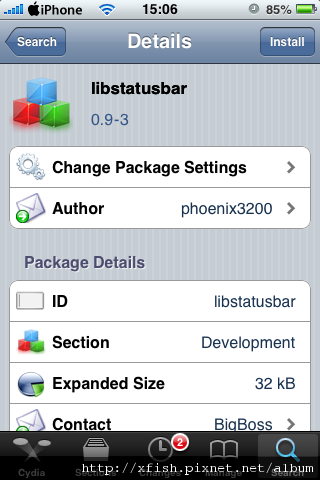
結果就出要這個訊息~原來新版的要安裝libstatusbar


可是進去Cydia卻搜尋不到 原來要更改一下設定

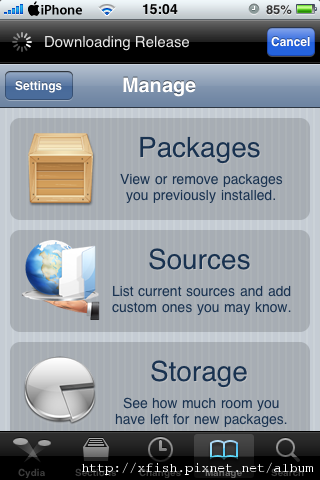
進去Cydia後 進去manage裡面


然後按一下左上角的Settings

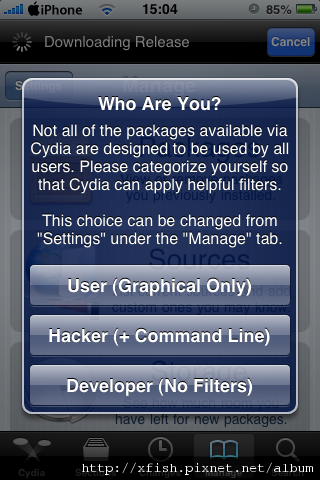
就會出現下面這個視窗 把你的設定改成Developer


然後再去搜尋就會找到libstatusbar這個軟體嚕

不過這個3.1.X版的不能裝喔 現在要到4.1版嚕


安裝完之後就可以看到

耶!!!出現嚕

而且新版的不用再去安裝圖示包就有嚕!!!

Enjoy it!!!


==========================================================================


舊版一下說明 :


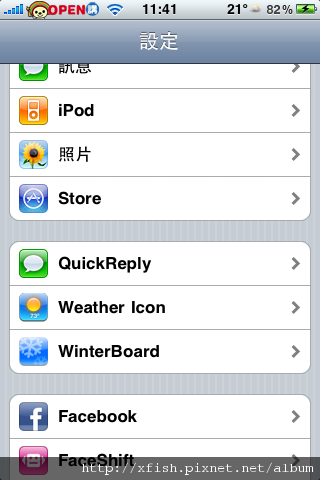
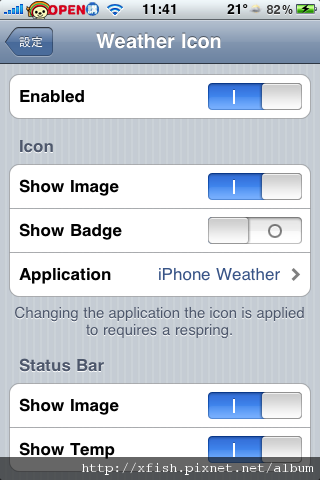
安裝好之後 進去設定裡面 你就會看到多出一個Weathericon的控制項


點進去以後勒 就會看到設定


將Status Bar裡面的兩個控制項

Show Image跟Show Temp打開 重新respring就ok嚕

不過這時候你應該會發現右上角只有秀出Temp但是卻沒有圖像對吧

請到這裡下載圖示包

下載完畢解壓縮以後

把附加檔的
com.ashman.WeatherIcon.plist
放到 /User/Library/Preferences /System/Library/CoreServices /SpringBoard.app
裡面

把圖示包裡面的圖放到
/System/Library/CoreServices/SpringBoard.app


respring一次 搞定~!!

你就會看到你的Status Bars上面出現溫度跟圖案嚕

另外 順便一提~如果你注意看的話

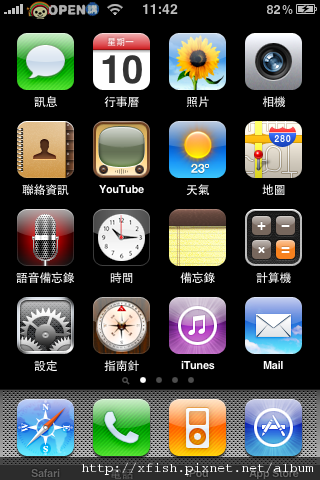
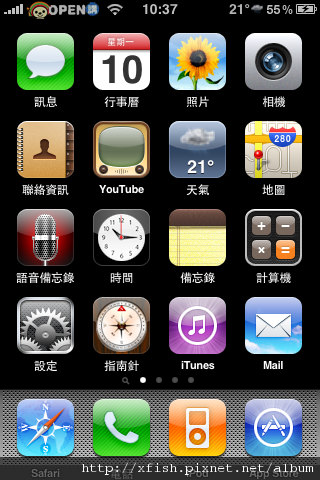
原本桌面上天氣的圖示也會跟著變動喔

這是原本的樣子


這是安裝WeatherIcon後

-------------------------------------------------------------------------

看到不一樣的地方了嗎?

另外要提醒一下 因為呢他這個是去網路即時更新天氣狀況的

所以~是會上網的唷~~~要注意

ps.而且很耗電 小心服用

Source: http://xfish.pixnet.net/blog/post/26187255

Saturday, February 19, 2011

Track Flight Status By Flight, Airport or Route

Track Flight Status By Flight, Airport or Route
http://www.flightstats.com/go/FlightStatus/flightStatusByFlight.do

itunes - How to change iPhone backup location on windows ?

The correct command line would be:

junction "C:\Documents and Settings\username\Application Data\Apple Computer\MobileSync\Backup" C:\Backup

iTunes now looks at "C:\Documents ...." which is a link to C:\Backup

Source: http://superuser.com/questions/180393/how-to-change-iphone-backup-location-on-windows

NTFS junction point

In computing, an NTFS junction point is a feature of the NTFS file system that provides the ability to create a symbolic link to a directory which then functions as an alias of that directory. This has many benefits over a Windows shell shortcut (.lnk) file, such as allowing access to files within the directory via Windows Explorer, the Command Prompt, etc.

Junction points can only link to directories on a local volume; junction points to remote shares are unsupported.[1]

Junction points are a type of NTFS reparse point; they were introduced with NTFS 3.0, the default file system for Windows 2000 (Windows NT 5.0). The Windows 2000 and Windows XP Resource Kits include a program called linkd to create junction points; Mark Russinovich of Winternals released a tool called junction which provided more complete functionality. Windows NT 6.0 and later operating systems include an mklink command-line utility for creating junction points.

Source: http://en.wikipedia.org/wiki/NTFS_junction_point

Change the Location of Your iPhone Backup

Are those iOS backups taking up too much space on your boot drive? While there’s no built-in function in the iTunes preferences menu for moving the archive folder, it’s a simple procedure on most platforms. While others have mentioned this in the past, I haven’t come across a single page with instructions for all major operating systems. For reference, the instructions are below:

Mac OS X
--------------
■Close iTunes
■Move the existing ~/Library/Application Support/MobileSync/Backup/ folder to the destination drive (for example, named BigExternalDrive)
■Open a command prompt by launching Terminal and create a symbolic link using a command similar to the one below, replacing /Volumes/BigExternalDrive/Backup with the path to your destination:

ln -s /Volumes/BigExternalDrive/Backup/ ~/Library/Application\ Support/MobileSync/Backup/

Windows Vista and Windows 7
-------------------------------------------
■Close iTunes
■Move the existing C:\Users\(username)\AppData\Roaming\Apple Computer\MobileSync\Backup\ folder to the destination drive (for example, D:\)
■Open a command prompt and create an NTFS junction point using a command similar to the one below, replacing D:\Backup with the path to your destination:

mklink /J "C:\Users\(username)\AppData\Roaming\Apple Computer\MobileSync\Backup" "D:\Backup"

Windows XP
------------------
■Close iTunes
■Download and extract this junction utility to your Desktop
■Move the existing C:\Documents and Settings\(username)\Application Data\Apple Computer\MobileSync\Backup\ folder to the destination drive (for example, D:\)
■Open a command prompt an NTFS junction point using a command similar to the one below, replacing D:\Backup with the path to your destination:

1. cd Desktop
2. junction "C:\Documents and Settings\(username)\Application Data\Apple Computer\MobileSync\Backup" "D:\Backup"

Source: http://oliveraaltonen.com/2011/01/03/change-the-location-of-your-iphone-backup/

Topic : Changing backup location.

You can't change the iTunes behavior, as far as I can tell.

However, you can use a feature of NTFS to point that folder to another drive. This feature is typically called a "junction" or "symbolic link".

You can use this tool to create a junction:
http://technet.microsoft.com/en-us/sysinternals/bb896768.aspx

For example, let's say you want your iPhone backup to be D:\backup. You would do this:

1. close iTunes
2. Move the folder c:\documents and settings\user\application data\apple computer\mobile sync\backup to D:\
3. Extract the junction.zip to the Desktop.
4. Open a command prompt and enter these commands:

cd Desktop
junction D:\backup "C:\Documents and Settings\username\Application Data\Apple Computer\Mobile Sync\Backup"

NOTE 1: Change "username" to match your current username, of course.

NOTE 2: I did not test the above! In general, junction points work OK, but only if programs don't mess with the linked directory (like rename or remove it). For example, if iTunes does something like delete the ...\Mobile Sync\Backup directory and then recreate it, it will no longer go to the D:\backups folder.

Source: http://discussions.apple.com/thread.jspa?threadID=2076697

Junction v1.06

By Mark Russinovich
Published: September 8, 2010

Download Junction (77.7 KB) = http://download.sysinternals.com/Files/Junction.zip

Windows 2000 and higher supports directory symbolic links, where a directory serves as a symbolic link to another directory on the computer. For example, if the directory D:\SYMLINK specified C:\WINNT\SYSTEM32 as its target, then an application accessing D:\SYMLINK\DRIVERS would in reality be accessing C:\WINNT\SYSTEM32\DRIVERS. Directory symbolic links are known as NTFS junctions in Windows. Unfortunately, Windows comes with no tools for creating junctions—you have to purchase the Win2K Resource Kit, which comes with the linkd program for creating junctions. I therefore decided to write my own junction-creating tool: Junction. Junction not only allows you to create NTFS junctions, it allows you to see if files or directories are actually reparse points. Reparse points are the mechanism on which NTFS junctions are based, and they are used by Windows' Remote Storage Service (RSS), as well as volume mount points.

Please read this Microsoft KB article for tips on using junctions.

Note that Windows does not support junctions to directories on remote shares.

If you want to view reparse information, the usage for Junction is the following:

Using JunctionUse junction to list junctions:

Usage: [-s]

-s Recurse subdirectories

Examples:

To determine if a file is a junction, specify the file name:

junction c:\test

To list junctions beneath a directory, include the –s switch:

junction -s c:\

To create a junction c:\Program-Files for "c:\Program Files":

C:\>md Program-Files

C:\>junction c:\Program-Files "c:\Program Files"

To delete a junction, use the –d switch:

junction -d c:\Program-Files

Source: http://technet.microsoft.com/en-us/sysinternals/bb896768.aspx

[教程]iPhone 4 更改運營商圖標的方法(附各大運營商圖標下載)

由於iphone 4的屏幕分辨率比原來的高,以前的修改方法無效了
可以自選任意圖標,圖標的格式只能是png,高度40像素,寬度不限
iphone4 需越獄,所需的軟件是iFunBox,搜索一下論壇有下載
註:如果只需要更文字的話可以在cydia 下載「Make It Mine

新的方法如下:
1. 把圖標文件分別改名為Default_CARRIER_XXX@2x.png 和 FSO_CARRIER_XXX@2x.png
XXX是你所用的iphone默認的運營商名字,
用iFunBox打開iphone的 private/var/mobile/Library/Carrier Bundle.bundle 裡面會有幾個png格式的文件,比如 Default_CARRIER_ China-Unicom.png,China-Unicom就是運營商名字)
2. 把改名後的兩個文件複製到 private/var/mobile/Library/Carrier Bundle.bundle 文件夾
3. 重啟

註:新的文件名後面必須有@2x,光覆蓋原有的文件是無效的,原有的文件也無需刪除


以下提供的圖標,下載解壓後把文件直接複製到 private/var/mobile/Library/Carrier Bundle.bundle文件夾後再重啟就可以了,(Default_CARRIER_XXX@2x.png和FSO_CARRIER_XXX@2x.png裡XXX的要和原 Default_CARRIER_XXX.png裡的XXX保持一致)
-------------------------------------------------------------------------------------------------------------------------------------------------
12.04 更新 O2, Optimus, Orange, TIM, Sprint, Mobilicity, kpn, movistar, Telus, Telefonica, Verizon, 3, kt, 遠傳, au, alltel, airtel, Public, SK, PCCW, 台灣大哥大, 數碼通-沃達豐, Savvytel, Telstra,

12.01 更新 Virgin,WIND, T-Mobile

Source: http://bbs.weiphone.com/read-htm-tid-983049.html

【iPhone】JB之後一定要嘗試的:手工打造我的美麗新iPhone(4)修改滑動區塊文字(新增原始檔案下載點)

2010/08/12更新:SpringBoards.strings原始檔

這個是我3G上面的備份檔 不曉得跟3Gs的一不一樣說~

請有要試著自己修改你的iPhone的人 一定要記得備份原始檔案唷~

--------------------------------------------------------------------------------

昨天iPhone不知道怎麼了 重開機一直進入Safe mode

後來毅然決然~砍掉重練

但是…當然待機畫面又變回原來醜醜的樣子


所以趁著這次順便來教大家 怎麼把「移動滑桿來解鎖」那段文字修改掉

首先呢 先來下載pledit.exe這個軟體

--------------------------------------------------------------------------------

剛發現 如果有更新iTunes到9.1版的話 會造成程式打不開的狀況

解決方法:

C:/Program Files/Common Files/Apple/Apple Application Support 這個檔案夾 copy到
C:/Program Files/Common Files/Apple/Mobile Device Support 這個目錄底下
然後將資料夾rename 成 bin

--------------------------------------------------------------------------------

然後呢利用iFunbox連到這個路徑 /System/Library/CoreServices/SpringBoard.app/zh_TW.lproj/

應該會看到有一個檔案叫~ SpringBoard.strings

將那個檔案複製到電腦端來 然後利用剛剛下載的pledit那個程式將那個strings檔案打開

應該會看到密密麻麻一堆文字 利用搜尋 尋找「滑桿」這個字串

應該也會找到一堆tag吧 可以依照你自己的需求去修改

像我只有修改解鎖的那一串文字 所以就是找到

AWAY_LOCK_LABEL

移動滑桿來解鎖

修改中間的那一串文字就可以嚕

把改好的檔案存檔 然後再存到原本的路徑裡覆蓋掉原始檔案

respring就ok嚕~~~~

我是直接把他清空~就會變成這樣


如果你比較偷懶 可以直接下載我已經修改好的 SpringBoard.strings 檔案 然後覆蓋到iPhone上就好

不過我就只有修改解鎖唷~~~

Source: http://xfish.pixnet.net/blog/post/25494471

Cydia 軟體介紹 , 包含免費及付費 ( 02/06 更新 )

同步分享於部落格 Cydia 免費程式介紹 Cydia 付費程式介紹

若無即時更新則以 Blog 為優先更新 , 內有部份軟體介紹

本文為 Cydia 軟體介紹 , 讓使用者以最簡短的內容了解程式的用途
因程式眾多 , 無法所有程式都安裝測試過 , 解說內容僅供參考
部份程式無法支援 iOS4 或只支援 iOS4 , 請使用者自行注意

內建的軟體源 , 找不到軟體前請先確認是否有在清單內
BigBoss : http://apt.thebigboss.org/repofiles/cydia/
ModMyi : http://apt.modmyi.com/
repo666 : http://repo666.ultrasn0w.com/
Telesphoreo : http://apt.saurik.com/
ZodTTD : http://cydia.zodttd.com/repo/cydia/


有些軟體在不在內建源內 , 請自行添加
http://cydia.iphone.org.hk/apt
http://repo.modyouri.com
http://kuaidial.googlecode.com/svn/deb/

==============================================
01/01 ~ 02/06 更新
BatteryLogger Plus : 計錄電池使用狀況 ( $2.50 )
CameraWallpaper : 將桌布變成相機所拍攝的畫面 ( $1.99 )
PhotoMail : 加入圖片到新郵件中 ( $1.00 )
Voice Notifications : 語音版的推播 ( 0.99 )
Ringtone Shuffler : 變更來電鈴聲 ( $1.99 )
App Switcher Ringer : 讓多工列可調整鈴聲大小 ( 0.99 )
iGoogler Pro : Google 好用程式集合 ( $1.99)
MyWi OnDemand : 讓 iPhone 變身為 Access Point ( $24.99 )
CallLogPro : 管理來電記錄 ( $2.49 )
Dimmer : 讓畫面更暗 ( $0.99 )
SpringClean : 多項桌面參數供調整 ( $1.49 )
DeepEnd : 讓桌面背景有立體感 ( $?.?? )
3DBoard : 讓桌面背景有立體感 ( $2.99 )
SilenceNow : 拿起手機立刻靜音 ( $2.99 )
YFiSelect : 在 Sbsettings 下快速切換 wifi ( $1.49 )
SilentMode Switcher : 用 Activator 啟動靜音 ( $1.00 )
AdBlocker : 擋以 safari function 動作的廣告 ( $1.99 )
CallLock : 來電時鎖屏 ( $0.99 )
Instant Mirror : 鎖屏畫面將背景以前置鏡頭當鏡子 ( $2.99 )
SleepFX : 鎖屏特效 ( $4.99 )
TV Tube Sleep : 鎖屏時如關電視般特效 ( $0.99 )
Brightness Switcher : 讓多工列可調整亮度 ( $?.?? )
CameraButtons : 用音量鍵拍照 ( $0.99 )
Click2Call : 將聯絡人做成桌面圖示 ( $1.99 )
VideoLock : 鎖屏後不暫停播放中的影片 ( $0.99 )
Mobile Kiosk : 即時查看系統資訊 ( $1.49 )
Stealth Cam : 鎖屏後仍可繼續錄影 ( $0.99 )
Vibrafications : 自訂義推播時的震動模式 ( $3.99 )
FreeSync : 與 itunes 同步時仍可使用裝置 ( $1.00 )
FullScreen for iPad : 讓 Safari 以全螢幕執行 ( $1.99 )
iLock : 多樣化的解鎖 ( $1.99 )
Move LockScreen to Unlock : 把鎖屏畫面直接滑出畫面完成解鎖 ( $0.99 )


PerPageHTML : 讓桌面有 widget 特色
ScreenDim : 利用 Activator 手勢讓畫面變暗
HomePage : 離開程式後自動回桌面第一頁
MissedCallOpening : 若有未接來電 , 開啟電話功能時自動開啟未接來電頁面
Polite Silencer : 晃動手機使用靜音功能
Shortener : 短網址功能
CleanStatus : 隱藏狀態列的圖示
VoiceActivator : 語音版的 Activator
confirmSMS : 簡訊寄出前需確認
disableEmergency : 禁用緊急電話功能
DePersisWifi : 鎖屏時自動關閉 wifi 及推播
Crash Reporter : 發送 crash reporter 給程式開發者
FlashLite : 開啟 iPhone4 LED 當手電筒
HiddenSMS Lite : 隱藏簡訊內容
PasswordGen : 密碼產生器
iRetiner : 變更 icon 為 Retiner 等級
iRetiner GUI : 變更 icon 為 Retiner 等級
MailSent : 成功寄出郵件後發出聲音通知
No Clock Status : 移除狀態列的時間
NoFolderPreview : 不顯示目錄圖示預覽
OSFaker : 仿 Android 的介面
ChangeCarrier : 變更 carrier name
No Rotation Status : 隱藏狀態列禁止旋轉圖示
CloudyShots : 上傳畫面截圖至雲端伺服器
AppInfo : 查看已安裝的軟體資訊
BinaryConverter : 二進位轉十進位程式
VibraficationsFree : 自訂義推播時的震動模式
PageLock : 禁止桌面滑動
FakeClockUp : 加速切換頁的時間
iName : 變更 carrier name
ShortenMe : 短網址功能
RoundCorners : 將桌面四週變成圓角
StartDial : 啟動電話後進入撥號頁面
NoAppStorePass : 記憶 Apple store 密碼

<<<>>>
PasteboardStacker : 剪貼簿記憶
==============================================

<<< 數字類 >>>

5-Row QWERTY Keyboard : 將英文鍵盤增加成五行
20 Second Lock Screen : 將 lockscreen 光亮延長 20 秒

<<<>>>
Action Menu : 剪貼簿功能增強
Activator : 以手勢或快捷方式呼叫程式
AdBlock : 關閉 Safari 中的廣告
AddCallHistory : 建立假來電通話記錄
aEasyCopy : 將剪貼簿中的文字以 wifi 傳到其它裝置上
afc2add : 能讓 ifunbox 等連接 iPhone 軟體看到系統目錄
airplayspeaker : 讓 iDecice 支援 airplay 功能
AllPlay : 讓 AirPlay 支援第三方軟體
AirVideoEnabler : 讓 Video 軟體可支援 AirPlay
AndroidLock : 仿 Android 的鎖屏
aNetCheck : 檢查 WIFI 的 IP 位址
AppStore Update Size : 在 apple store 顯示要下載程式的大小
Applinks : 快速找出軟體安裝的目錄
App Search : 新的搜尋引擎 for apple store
AppBackup : 備份及還原 App
AskToCall : 撥打電話前需確認
AutoClose Folder : 執行程式後關閉目錄

<<<>>>
BackBoard : 桌面備份管理程式
backgrounder : 允許程式背景執行
BatteryInfo Lite : 電池狀態分析
BatteryLogger Lite : 記錄電池的使用狀況
Blacksn0w : 3GS unlock 程式 ( 僅支援 BB 5.11.07 )
bosspaper : 桌布程式 , 可定時切換
Browser Changer : 可用非 Safari 來開啟網頁
Browser Translator : 網頁翻譯

<<<>>>
Call IntoFields : 新增來電要顯示的欄位
Caller ID Faker : 變更自己的號碼
CallMe : 建立快捷撥號於桌面
Categories : 可在桌面上建立目錄並放入程式
Chronus : 可備份 App 記錄
Circuitous : 多工切換 ( OS3 )
ColourExtractor : 可調整照片的 RGB 色調
CustomBadges : 自訂圖示角標的顯示內容
Cydelete : 允許 Cydia 程式在桌面刪除
Cydia in Chinese : 讓 Cydia 擁有中文介面

<<<>>>
Direct Closer : 多工列圖示增加移除角標
Disable Multitasking iOS4 : 關閉 iOS4 內建的多工

<<<>>>
EnhancedTaps : 增強 Safari 內 Tap 鍵的功能
Extended Preferences : 增加設定內的參數
Emoj : 打開表情圖輸入的功能於日本鍵盤模式
Emoji Toggle : 開啟或關閉表情符號輸入功能
EmojiEnabler : 開啟或關閉表情符號輸入功能
EmojiPad : 增加表情符號於鍵盤模式
eWifi : 搜尋附近的 Wifi 訊號

<<<>>>
FakeCarrier : 改變訊號顯示名稱及時間顯示
Fake Operator : 改變訊號顯示名稱
Fast Copy : 移除剪貼簿的 Delay 時間
Five Icon Dock : 增加 Dock 數量至五個
Five Icon Switcher : 多工列顯示五個
FiveRow : 每頁圖示可顯示五行
FiveColumn : 每行圖示可顯示五個
Flashlight : 將 iPhone 當成手電筒
FolderCloser : 執行程式後自動關閉目錄
FullForce : 強迫程式在 iPad 上全螢幕顯示
FontSwap : 可變更 iPhone 英文字型
fsWipeCache : 變更目錄的桌布
FWViewer : 快速查看韌體版本

<<<>>>

<<<>>>
HDREnable : 讓 iPod Touch 4 也有 HDR 功能

<<<>>>
ibirthdays : 自動搜尋通訊錄中名單中的生日加入清單
iblank : 增加空白圖示
iblank for iPad : 增加空白圖示
Icon Renamer : 程式改名稱
IconSpiral : 螺旋型的桌面排列
Icy : 類似 Cydia 的程式
iMAME4ALL : 街機模擬程式
iMemory Enhancer : 虛記憶體程式
iNoRotate : 關閉旋轉畫面功能
Insomnia : 鎖屏時 WIFI 不斷開
iPhoneDelivery : 訊息回執
iSH**** : 備份 SHSH 金鑰
iTracker : iPhone 追縱防盜

<<<>>>
<<<>>>

kirikae : 快速切換程式 ( OS3 )
KuaiDail : 撥號增強功能 , 支援單筆通話刪除

<<<>>>
LiveClock : 讓桌面時鐘動起來
Lockinfo 2Do Plugin : 讓 Lockinfo 支援 2Do
Lockinfo Clock Plugin : 讓 Lockinfo 顯示時鐘
Lockinfo RSS Plugin : 讓 Lockinfo 支援 RSS
Lockinfo Things Plugin : 讓 Lockinfo 支援 Things
Lockinfo Todo Plugin : 讓 Lockinfo 支援 Todo
Lockinfo Twitter Plugin : 讓 Lockinfo 支援 Twitter
Lockino Weather Plugin : 讓 Lockinfo 顯示天氣
Lockinfo Lock Weather : 讓 Lockinfo 顯示天氣
Lockscreen Clock Hide : 隱藏鎖屏畫面的時鐘
Lockscreen Dim Delay Control : 可設定鎖屏畫面延遲的時間
LockVibe : 設定你想要震動的項目

<<<>>>
Map Enhancer : 可增加地圖的快取 , 方便離線瀏覽
MakeItMine : 自定電信系統名稱
MMPkill : 關閉所有執行中媒體類的程式
Mobile Terminal : 能在 iPhone 上執行指令
MultiIconMover : 一次同時移動多個 icon

<<<>>>
No Page Dots : 移除桌面的分頁小圓點
NoMute for iPad : 將 iPad 的靜音鍵改為禁止旋轉鍵
NoWiggle : 刪除模式時圖案不抖動

<<<>>>
OpenSSH : WinSCP 等與 iPhone 連線程式必備程式

<<<>>>
PhoneCloser : 接聽來電後自動回到桌面而不停留在電話簿
Proof : 隱藏圖示
ProSwitcher : 多工程式切換
Pull To Refresh for Mail : 滑動方式更新 Mail
Pull To Refresh Safari : Safari 下拉視窗重整
PushMod : 可變更 push mail 的時間

<<<>>>
Quicklock : 一鍵鎖屏 ( OS3 )
Quicklock2 : 一鍵鎖屏 ( iOS4 )
QuickScroll 2 : 讓 iPhone 有像 IE 一樣的捲動軸
QuickUnlock : 在鎖屏畫面按 home 三次即可解鎖

<<<>>>
ReflectiveDock : 讓桌面 icon 產生倒影
Rename : 變更程式名稱
Repeat Memory Free : 定時自動清除記憶體
Remove Recents : 移除多工列中的程式

<<<>>>
SAM : 讓非原廠 Sim 卡也能開通
SB Hidden StatusBar : 隱藏 statusbar
SBKill : 一鍵 respring
SBPhotoDial : 建立聯絡人快速撥號於桌面
SBSettings : 快速開關設定工具 , 功能強大
Search : 搜尋出來的資料可依 mail , 簡訊 , 聯絡人 等等分類
Silent Charge : 關閉充電時的震動
Sleep : 在設定的時間後自動 Respring
Slide to Unlock Killer : 刪除滑動解鎖的顯示
Smoothboard : 讓桌面平順的滑動 , 不會一頁一頁跳
Springback : 快速備份及還原桌面 icon 位置
SpringBuild : 重建桌面快取
SpringMe : 快速 respring
Springflash : 開始 LED 當手電筒用
SpringsJumps : 建立頁面圖示方便跳頁
Status Notifier : 在 statusbar 上顯示 來電 簡訊 郵件 等 icon
StayOpened : 在 Apple store 下載程式時不退出

<<<>>>
torrent Downloader Safari : 讓 Safari 可以下載 .torrent 檔案

<<<>>>
UDIDFaker : 變更 UDID
UnlimTones : 在線鈴聲製作
Unlock Remover : 移除鎖屏的滑動條

<<<>>>
VolumeButtonExtender : 用音量鍵來控制 iPod 的背景播放
VUnlock : 鎖屏時按音量鍵可快速解鎖
Volume Boost : 加大來電音量

<<<>>>
weatherlcon : 讓天氣圖示顯示天氣及氣溫
Winterboard : 佈景主題程式 , 功能強大

<<<>>>
<<<>>>
YFiSelect : 快速換切 wifi 訊號

<<<>>>

====================================================

<<<>>>
Volume Slider Widget : 調整音量大小
Rotation Inhabitor : 開啟或禁止自動轉正功能
SBSilent : 靜音功能
Tethering : Internet 分享功能
Push Mail 快速切換 Push Mail 功能
fakeAPN : 修改 APN 設定成 fake.internet 中斷網路功能
Autolock : 開啟或禁止 iPhone 自動待機功能
KeepAwake : 避免 iPhone 待機後 WIFI 斷線
airplane : 開啟飛行模式
Ringer/Silent : 靜音模式
Ring Vibrate : 開啟響鈴及靜音時的振動
Springflash : 開啟 LED 當手電筒
NoCyfresh : 關閉 Cydia 的更新
RemoveBG : 移除多工列內的圖示
Safari Download : 開啟 Safari 的下載
VPN : VPN 開關
SBAdBlock : 關閉程式中的廣告
Prevent Sleep : 避免進入待機模式
iPod Widget : 快速開啟 iPod
ScrollingBoard : 讓 dock 及目錄有滑動功能
Caller ID : 讓來電不顯示姓名
InvertColors SBSettings : 顏色反向

<<<>>>
Auto Silent : Auto Silent 程式開關
SBaTimeTool : aTimeTool 程式開關
Insomnia toggle : Insomnia 程式開關
Inspell toggle : Inspell 程式開關
xDrive toggle : xDrive 程式開關
SBRotator toggle : SBRotator 程式開關
Poweralerter : Poweralerter 開關
iControl : iControl 開關

<<< 軟體價格若無特別註明即為美金 >>>

<<< 數字類 >>>
3G Unrestrictor : 將 3G 訊號摸擬成 WiFi 訊號 ( $2.99 )
5-Row Keyboard iOS4 : 將英文鍵盤增加成五行 ( $0.99 )

<<<>>>
Action Menu Plus Pack : 剪貼簿功能增強 ($2.99 )
AnyRing : 讓 iPhone 可使用 MP3 鈴聲 ( $3.99 )
AppLocker : 鎖定程式 ( $1.99 )
App Switcher Brightness : 讓多工列可調整亮度 ( $0.99 )
App Switcher Rotator : 可旋轉多工列 ( $1.49 )
App Switcher Volume : 多工列增加調整音量功能 ( $0.99 )
AskToSend : 讓簡訊及 mail 發送前確認後才可寄出 ( $0.99 )
aTimeTool : 讓 iPhone 在設定時間進入設定好的模式 ( $5.99 )
AttachmentSaver : 允許將郵件附件存檔 ( $1.99 )
Auto Silent : 定時切換靜音模式 ( $2.99 )
Auto3G : 依設定模式自動開啟或關閉 3G 訊號 ( $3.99 )
Auto ShutDown : 設定時間自動關機或重啟 ( $1.49 )

<<<>>>
BackLiter : 一鍵調整背光亮度 ( $0.99 )
Barrel : 3D 特效的翻頁 ( $2.99 )
BatteryDetective : 分析背景中程式的耗電量 ( $1.99 )
biteSMS : 簡訊軟體 , 支援定時發送等等功能 ( $?.?? )

<<<>>>
Call Counter 3 : 計算你的通話時間 ( $2.99 )
CallClear : 允許刪除單筆通話記錄 ( $3.99 )
CallLock : 來電時鎖屏 ( $0.99 )
CallTell : 來電時讀出來電人姓名 ( $1.99 )
Categories SB : Categories 的加強 , 增加 Categories 開啟速度 ( $0.99 )
ChatPic : 讓聯絡人照片顯示在簡訊前 ( $0.99 )
CyDialer : 鎖屏畫面播電話軟體 ( $1.74 )
Cyntact : 電話簿前顯示大頭貼 ( $1.00 )

<<<>>>
Direct Closer Pro: 多工列圖示增加移除角標 ( $1.00 )
DisplayOut : 將螢幕訊號傳送至 TV ( $2.99 )
Dock : 同 Mac 底下的 Dock 快捷列 ( $10 RMB )

<<<>>>
External iPod Controls : 用音量鍵來控制 iPod 功能 ( $0.99 )
EZDecline : 讓鎖屏時的來電有拒絕按鈕 ( $0.99 )

<<<>>>
FaceBreak : 讓 FaceTime 可以使用 3G 訊號 ( $1.49 )
FakeLocation : 欺騙 GPS 的程式 ( $2.79 EUR )
FastNumber : 快速將輸入的資料存檔 ( $0.99 )
FastPhotoLibrary : 讓你快速進到相簿內 ( 好像就只有這樣的功能 ) ( $1.49 )
FastSnap : 可使用音量鍵拍照 ( $0.99 )
Firewall iP : 流量管理 ( $2.99 )
FullPreview : 在 itune store 內可完整預覽音樂及影片 ( $1.99 )
FolderEnhancer : 讓目錄突破 12 個限制 , 並支援 Multiiconmover 功能 ( $2.50 )
FoldersInFolders : 讓目錄中可以再建目錄 ( $1.99 )
FullScreen for Safari : 讓 Safari 可以全螢幕顯示 ( $1.99 )

<<<>>>
gpSPhone : GBA 模擬器 ( $4.99 )
GroupSMS : 可群發簡訊 ( $1.99 )
Gpower Pro : 關機畫面增加 reboot 及 respring ( $0.99 )
Graviboard : 讓桌面圖示依地心引力方向移動 ( $2.99 )
Gridlock : 圖標可任意放置桌面任何位置 ( $0.99 )
GridTap for Safari : 讓 Safari 的分頁以縮圖顯示 ( $0.99 )
GroupSend : 群發訊息 ( $ 1.49 )

<<<>>>
HD Photographer : 可拍攝 720 度全景照片 ( $0.99 )
Here It Is : 將目前地圖所在位置以訊息發送給別人 ( $2.99 )
HideEmall : 可將照片及訊息隱藏 ( $0.99 )
Home Page in Safari : 可以設定 Safari 首頁 ( $1.99 )

<<<>>>
iAcces : 非常有名的輸入法 , 支援倉頡 無蝦米 行列 等等 ( $15.00 )
iBlacklist : 黑名單軟體 , 可以阻擋特定人事來電及簡訊 ( $12.00 )
iBlueNova : 讓 iPhone 可與其它裝置藍牙傳輸 ( $5.99 )
iBye : 可備份 Apple stor 及 Cydia 的 App ( 1.99 )
iCallAnnounce : 讀出來電姓名及訊息內容 ( $1.99 )
iCallLog : 通話明細分析 ( $2.90 )
iClassic : 仿 iPod 的播放介面 ( $2.00 )
Iconoclasm : 自訂你的桌面圖示排列 ( $3.00 )
iControl : 設定及自動管理 WIFI , 3G , 藍牙等等訊號 ( $4.99 )
iFile : iPhone 內的檔案總管 ( $4.00 )
Infinidock : 增加 Dock 5 ~ 20 個 , 可翻頁 ( $0.99 )
Infiniboard : 解除同一頁的 icon 的數量限制 , 可上下捲動 ( $1.99 )
Infinifolders : 突破目錄 12 個程式限制 ( $1.99 )
iGotYa : iPhone 防盜軟體 ( $4.99 )
iLostMyi :以簡訊發送到遺失的 iPhone ( $2.99 )
iMusicinfo : 顯示歌詞 ( $0.99 )
IntelliDial : 鎖屏時以 Coverflow 介面顯示聯絡人 ( $2.99 )
Insomnia Pro : 鎖屏時 WIFI 不斷開 ( $1.99 )
Inspell : 設定自動檢查及自動修正 ( $3.99 )
iPod Remote Controller : 用 iPhone 搖控其它 iDevice ( $1.00 )
ItelliScreen : 鎖屏工具程式 , 可在鎖屏畫面顯示多項資訊 ( $?.?? )
iScheduler : 設定定時開啟 iPhone 的各種服務 ( $7.99 )
iWipe : 徹底刪除 iPhone 上資料 , 無法救回 ( $2.99 )

<<<>>>
<<<>>>

<<<>>>
Light Bright : 用音量鍵調整亮度 ( $0.99 )
ListLauncher : 在搜尋頁面顯示所有 App ( $0.99 )
Lockinfo : 鎖屏工具程式 , 可在鎖屏畫面顯示多項資訊 ( $4.99 )

<<<>>>
Mail Rules : 設定收到新郵件時要做的動作 ( $1.99 )
MobileLog : 詳細的通話明細記錄 , 支援單筆刪除及取代內建通話明細 ( $7.49 )
MultiCleaner : 快速清除多工列內的圖示 ( $0.99 )
Multifl0w : 背景程式切換 ( $4.99 )
Music Controls Pro : 強大的控制音樂程式 ( $5.99 )
My3G : 讓 3G 假裝成 Wifi ( $3.99 )
MyWi : 讓 iPhone 變身為 Access Point ( $19.99 )

<<<>>>
<<<>>>
Optimized Zhuyin Keyboard : 優化的注音鍵盤 ( $2.99 )
Orbit : 快速跳頁 , ( $1.99 )
Overboard: 快速跳頁 , 並解除 iPhone 桌面 11 頁上限 ( $1.99 )

<<<>>>
PhotoAlbums+ : 相簿管理 ( $2.99 )
Phone GV Extension : 增加 Google Voice 功能於電話簿中 ( $2.99 )
PlaceToggle : 自動依地區不同更新設定的設定 ( $2.99 EUR )
PlaceTrack : 背景更新定位 for Google Latitude ( $1.99 )
Plugged In : 在充電模式時自動啟動指定的程式 ( $1.99 )
PkgBackUp : 記錄 Cydia 程式清單並一鍵快速回復 ( $3.49 )
Popup Blocker : 關閉一切跳出的視窗 ( $?.?? )
PowerAlerter : 設定電力不足的警告功能 ( $1.50 )

<<<>>>
QuickDo : 以手勢取代多種按鍵或啟動方式 ( $20 RMB )
QuickDo for iPad 以手勢取代多種按鍵或啟動方式 ( $20 RMB )

<<<>>>
Recent/CallLog Delete : 允許單筆刪除通話記錄 ( $1.49 )
Resupported : 讓 iPhone 支援非原廠的 TV out 線 ( $1.99 )
RetinaAppIcons : 將舊版程式圖示變為 Retina 等級圖示 ( $0.99 )
RetinaPad : 將 iPhone 程式以 retina 模式在 iPad 上執行 ( $2.99 )

<<<>>>
Safari Download Manager : 允許 Safari 下載檔案 ( $2.00 )
ScreenDimmer : 調整 iPhone 待機時間 , 節省電力 ( $0.99 )
ScrollingBoard : 讓 Dock 及目錄有捲動功能 ( $1.49 )
Signal : 可顯示附近基地台強度 ( $4.99 )
SB 2 Cloud : 上傳 screen shot 到雲端伺服器 ( $1.49 )
SBSchedule : 自訂開關模式 , 可以不同場合需求設定各項開關 ( $2.99 )
SBOrganizer : 讓你在 iPhone 中快速調整每頁的 icon ( $0.99 )
SBRotator : 讓桌面也可以隨使用角度自動旋轉 ( $1.99 )
SBRotator 4 : 讓桌面可以橫向轉動 ( $1.99 )
Shrink : 縮小桌面圖示看起來不擁擠 ( 適用於使用 5x5 桌面時 ) ( $0.99 )
SIManager : 允許 iPhone 備份電話簿到 SIM 卡裡 ( $?.? )
Smartscreen : 鎖屏工具程式 , 可在鎖屏畫面顯示多項資訊 ( $?.?? )
snes4iphone : 超級任天堂模擬器 ( $5.99 )
SnapTap : 用音量鍵來拍照 ( $0.99 )
Snappy : 在任何畫面都能以快速鍵呼叫相機 ( $1.99 )
SpringSorter : 自動依使用次數變更圖示排列 , 並支援桌面圖示位置備份 ( $1.99 ) ( OS3 )
Stack : 讓 1 ~ 16 個圖示存在同一個 icon 中 ( Categories 功能更強 ) ( $?.?? )
Syynchronicity : 同步時可使用 iPhone ( $2.00 )

<<<>>>
ToneFX : 可變更系統預設音效 , 並且隨機來電鈴聲 ( $4.99 )

<<<>>>
<<<>>>
<<<>>>

WebLeaps : Web 搜尋功具 ( $1.99 )
Wi Fi Analyzer : 可顯示附近的 Wi Fi 訊號
Wi-Fi Sync : 使用 Wifi 來同步 iPhone ( $9.99 )

<<<>>>
<<<>>>
Yourtube : 可下載 Youtube 上的影片至 iPhone 中 ( $2.00 )
Yourtube 2 : 可下載 Youtube 上的影片至 iPhone 中 ( $2.00 ) ( iOS4 )

<<<>>>

[Crack] Folder Enhancer 1.3.4.1-1


Update : Version 1.3.4.1-1 released ! Crack is out !!

v1.3.4.1-1
MOD: The earlier release used "FEFolderBG-Portrait.png" for the portrait image file, which takes precedence over "FEFolderBG.png".
This caused the default file to override certain third-party themes.

v1.3.4
NEW: Included folder image for use with landscape on non-iPad devices (via SBRotator).
Note that the image was designed for use with 3 rows of icons, with icon labels hidden.
FIX: Handle case when status bar is hidden.
Users with the status bar hidden will need to provide their own folder wallpaper, as the default is designed for use with the status bar visible.
MOD: Updated for use with iOS 4.2.6 (Verizon users).


Download 1.3.4.1-1 Cracked : Official


HOW-TO DISABLE ANTI-PIRACY MESSAGE


There is a timebomb in this app that will cause it to stop working after a certain amount of time (like a week or two). You will know when this occurs as you will receive a notice that looks like this...


This ONLY HAPPENS when you install FolderEnahncer from the repo because the app has a security check that looks to see where the package was installed from. If you installed from anywhere other than the official source then you will receive this piracy notice AFTER the evaluation period has expired. When this happens the you must follow the instructions below to get the app working again.

1. Open Cydia and uninstall the version of FolderEnhancer Cracked that you installed from the
repo
2. Now download the latest version of FolderEnhancer right here FolderEnhancer v1.3.4.1-1
Cracked

3. Now you must FTP into your phone using something like iSutal, WinSCP, or iFunBox
4. Navigate your way to the folder /private/var/root/Media/Cydia/AutoInstall (If you get to
the Media folder and find that there is no Cydia folder then you just need to manually create
one. Same with the AutoInstall folder. THEY ARE CASE SENSITIVE!!)
5. Now drag&drop the FolderEnhancer deb file that you downloaded in step 2 into
the /private/var/root/Media/Cydia/AutoInstall folder
6. Now just reboot your device so that FolderEnhancer will be installed
7. Then reboot your device once more to finalize everything

Enjoy!


Enhance iOS 4's native folders!
iOS 4 brought with it the ability to put apps and bookmarks into folders. Unfortunately, the implementation is quite limited.

FolderEnhancer takes this feature and improves upon it, making it a viable solution for organizing and accessing your apps.


Features:

o Open folders faster.
o Add up to 320 icons to a folder (20 pages, 16 per page).
o Create folders inside of folders.
o Create folders on the dock.
o Supports Iconoclasm for custom layouts inside of folders.
o Extends MultiIconMover to allow moving multiple icons into/out of folders.
o Options include hiding the folder name and wallpaper, as well as disabling animations.


FolderEnhancer intregrates with and works as a part of the home screen application (SpringBoard).
Creating and opening folders is done as normal.
Closing a folder can be done by either tapping on an empty part of the folder, or by swiping downward.
To remove an icon from a folder, drag the icon over the dock area and either wait for the current folder to close, or drop the icon to remove it from all folders.
Note that icons can not be directly moved between folders and the dock, as this would interfere with moving icons to parent folders. Grabbing a dock icon while a folder is open will cause the folder to close.


Options:

Folder Name
(Default: On)

Off: The name of the folder will be hidden.
On: The name of the folder will be displayed above the icons in the open folder.

Folder Wallpaper
(Default: On)

Off: The background of the folder will be transparent, and the SpringBoard wallpaper will be visible.
On: An image file will be used for the background of the folder.

For information on replacing this image file, please see the FAQ.

Animate Open/Close
(Default: On)

Off: When opening or closing a folder, the folder will appear without animating.
On: When opening or closing a folder, the folder will zoom in or out.

Clipping Window
(Default: On)

For the default background image, a clipping window is used to make it appear that the icons stay inside the rounded frame.

Whether or not one would want this enabled for a custom wallpaper image depends on the design of the image.

Off: Icons will remain visible up to the edge of the screen.
On: Icons will begin to disappear several pixels before reaching the left or right edge of the screen.

Note that this option has no effect when "Folder Wallpaper" is "Off".


Known Issue's:

iTunes-related

Because iTunes is not designed to handle subfolders or folders with more than 12 icons, it is not possible to use iTunes' icon layout feature.

FolderEnhancer uses IconSupport to prevent any errors with iTunes. Any attempt to change layout via iTunes will safely be ignored.

For rearranging icons rapidly, the developer recommends using the MultiIconMover extension.

FaQ's:

Can I use my own folder wallpaper image?

Yes. The image file is located at:

/System/Library/CoreServices/
SpringBoard.app/
FEFolderBG.png

(Use FEFolderBG@2x.png for devices with retina displays).

Overwriting this file is not recommended, though, as it will be replaced with each FolderEnhancer upgrade.

Instead, the recommended method is to use WinterBoard (by Jay Freeman, available for free via Cydia).

The WinterBoard path to use is:

Some.theme/Bundles/
com.apple.springboard/
FEFolderBG.png

Where is feature X from CategoriesSB?

While FolderEnhancer is designed after CategoriesSB, it does not have all the same options.

One reason for this is that some of the options are either already built into iOS 4 (badges), or are always on (tap/swipe to close).

Another reason is that some options are not feasible with FolderEnhancer or iOS 4. One such option is the ability to hide the dock; if the dock were hidden, it would not be possible to drag icons out of a folder.

How to Fix Folder Enhancer "Piracy Hurt" Error

Some of you may get the below error while using “unauthorized” Folder Enhancer version 1.1.1-1, it’s because your evaluation period has expired, and you got to purchase it due to the effort of the developer. However, if you wish to continue to “evaluate” this fantastic software, you got to do something to remove the error. In this tutorial, i will guide you how to remove the “Piracy Hurt” error for your Folder Enhancer on your iPhone 4/3GS/3G.


1. Uninstalled the app in Cydia, go to Manage – Packages – FolderEnhancer – Modify – Remove
2. Launch your i-Funbox ( other SSH tools are working too )
3. Deleted /var/mobile/Library/Preferences/jp.ashikase.folderenhancer.plist
4. Download latest version of FolderEnhancer .deb file from here
5. Put the .deb into the cydia /var/root/Media/Cydia/AutoInstall/
6. Respring or Reboot your iPhone


Notes :
Installation

--------------------------------------------
Previous Version
1.3.3-1 : Official
1.3.2-1 : Official
1.3.1-1 : Official
1.3.0-1 : Official
1.2.1-1 : Official
1.1.5-1 : Official
1.1.4-1 : Official
1.1.3-1 : Official
1.1.2-1 : Official
1.1.1-1 : Official
1.1.0-1 : Official
1.0.5-1 : Official
1.0.4-1 : Official
1.0.3-1 : Official
1.0.3 : Official


Source: http://hackstor.blogspot.com/2010/10/folder-enhancer-103-1-crack.html

Friday, December 24, 2010

“拿到iPhone的第一件事” 教學!!

“拿到iPhone的第一件事” 教學!!以後你們會感激我的


第一件事如果我說要開通肯定會被公幹+無梗太遜了

我當然教大家非常重要的一件事

就是第一時間快去備份 iOS 的 shsh 金鑰編碼!!

步驟如下:
1. 請至 http://thefirmwareumbrella.blogspot.com/ 網站
2. 請依照你使用的PC種類下載右手邊最新版的 TinyUmbrella 小雨傘
3. 將你的 iPhone 連接你的電腦
4. 執行 TinyUmbrella 小雨傘程式,此時程式會自動偵測你的 iPhone 種類與版本
5. 點選左上角的 Save My SHSH 按鈕 即可順利取得目前版本 (iOS 4.1) 的 shsh 備份


備份 shsh 是非常重要而且好用的不管你是否要...

[機場接送] 2010 白金卡信用卡免費機場接送總整理

2010兆豐小金剛白金卡機場接送,新光銀行無限卡機場接送,匯豐銀行白金卡機場接送,蘇格蘭皇家中華航空白金卡機場接送,聯邦銀行白金卡機場接送,花旗白金卡機場接送,玉山商務白金卡機場接送

兆豐小金剛白金卡
優惠:1年可以無限次,視消費而定
限制:持卡第一年消費滿 3萬免費,使用服務前一個月內支付團費或機票費用
第二年起需消費15萬元以上才有接送機各1次接送必須同時,送機和接機算2次
預約專線:0800-655-885
這張滴兒很喜歡,因為圖樣很可愛,優惠也不錯

新光銀行無限卡
優惠:1年6次接機或送機
限制:是用年度來計算的,1/1到12/31算一年,刷機票全額或團費八成
使用服務前兩個月內需消費滿10000元可含團費或機票,送機和接機算兩次
預約專線:0800-003-300
滴兒覺得這張門檻有點高,因為前兩個月內需消費滿10000元,不過可以包含機票錢就是了

匯豐銀行白金卡
優惠:1年送1次接機或送機
限制:支付80%以上團費或全部機票票款。
當次旅遊團費及最近2個月帳單新增消費達NT$100,000(含)以上,可享國際機場接機或送機一趟免費服務
預約專線:0800-860-929
滴兒覺得這張門檻超高,只有一次,而且前兩個月內需消費滿十萬元

聯邦銀行白金卡
優惠:1年1次接機或送機
限制:使用優惠前12個月消費滿15萬。
預約專線:0800-822-885
滴兒覺得這張門檻更高,只有一次,而且前兩個月內需消費滿十五萬元

蘇格蘭皇家中華航空白金卡
優惠:1年2次接機或送機
限制:1/1到12/31算一年,刷卡支付華航機票全額或團費80%(需搭乘華航),消費金額要20000以上
預約專線:0800-662-688
滴兒覺得這張門檻還算OK,適用於搭乘華航的時候使用

花旗白金卡
優惠:1年1次
限制:支付團費或機票費用80%以上,優惠價單程588
預約專線:02-27993588
滴兒覺得588算便宜了,四個人搭乘還算划算

玉山商務白金卡
優惠:可紅利兌換或接送機折扣
限制:每10,000點紅利點數可兌換一次國際機場接或送服務
預約專線:02-2182-1313
滴兒覺得平常紅利本來就用不完了,所以如果紅利有夠的話就換掉吧

其它

免費機場接送相關新聞

VISA頂級卡2010優惠

聯邦 要刷15萬才有一次接或送

新光無限卡或是鈦鑽卡 新鑽卡


史上第一超級無敵的銀行免付費電話表(*號可以用手機撥打)

000中央銀行 02-23936161
001中央信託 0800088898 02-23111511 0800055099
002農民銀行 0800000584 02-21003456
003交通銀行 0800055968 02-23147644
004臺灣銀行 *0800000258 02-23758119 0800025168
005土地銀行 0800282099 02-23612543 0800089369
006合作金庫 0800033175 04-22273131
007第一銀行 0800031111 02-23481666 02-21811111
008華南銀行 *0800036132 02-23117171 *0800231039
009彰化銀行 0800365889 02-81812933 03-3401817 0800021268
010華僑銀行 *0800022866 02-82411234 *0800000881
011上海商銀 *0800003111 02-23911111 *0800050111
012台北富邦 0800099799 0800007889 02-87516665
013國泰世華 0800818001 02-23831000 08-7379393
016高雄銀行 *0800029666 07-3951414 07-5590527
017兆豐商銀 *0800221152 02-23926333 *0800056868 *0800056056
021花旗銀行 0800012345 *0800213000 02-25768000 0800366333
024美國運通 *0800011511 02-27190707 0800050060 0800021002
039荷蘭銀行 *0800066660 02-77070168 0800099990 0800006226
050台灣企銀 *0800007171
051台北商銀 *0800222079 02-25063333 0800520520
052新竹商銀 *0800785580 03-5715050
053台中商銀 *0800077080
054京城銀行 0800800369 06-2135231 0800611140

056花蓮企銀 *0800087687 0800051234
057台東企銀 *0800005008


單位名稱 (免)付費電話 (行動)電話 (行動)電話 備註
081匯豐銀行 *0800000098 0800066088 *0800055456 02-80723000
*0800258365 *0800886365 02-80733102
083渣打銀行 *0800600000 02-25477888 0800600001 0800600002
092瑞士銀行 02-87227888
102華泰銀行 02-27515577
103新光銀行 0800020520 02-25679458 0800081108 02-81777055
108陽信銀行 *0800888737 02-28220122 0800085134
118板信銀行 0800038666
150新光銀行 *0800060601

700郵 局 0800700365 04-23542030

801萬通銀行 02-25506988
802大安銀行 02-25189111
803聯邦銀行 *0800064168 02-25455168 0800066678
804中華商銀 *0800000088 0800011388 0800012066
805遠東銀行 *0800213198 02-23121616 *0800231788
806復華銀行 *0800017999 0800001123
807建華銀行 *0800088111 02-27680808
808玉山銀行 *0800081313 02-23881313 *0800751068 *0800029666
809萬泰銀行 0800212957 0800047777
810寶華銀行 0800231458 02-27568000 0800668000

812台新銀行 *0800000456 0800023123 0800888800 0800085858
814大眾銀行 0800011456 02-87978066 0800020608
815日盛銀行 *0800060888
816安泰銀行 0800005999 02-26560808 0809056888


單位名稱 (免)付費電話 (行動)電話 (行動)電話 備註
822中國信託 *0800001000 02-25451234 0800024365 0800000685
825慶豐銀行 *0800007993 02-27773033 0800090825
101台北一信 0800222036
104台北五信 *0800025068
114台北九信 02-23366786

永豐信用卡 *0800058888 02-27287776 0800280168
永旺信用卡 0809001090 0800861090


012富邦02-87511313.
017兆豐*0800056888.
103新光0800388888.
803.聯邦0800724168.
801-802.2家銀行非別沒有代號了.
801萬通被中信合併.
802大安也已被台新合併了.
010僑銀0800022866不能用手機打喔.
806復華也不能用手機打喔.
807永豐銀行0800-088-111.
808.玉山0800301313.
809.萬泰0800037777.
815.日盛0800860888不能用手機打喔.0800000688.
816.安泰0800026999.
825.慶豐*0800079789
中央信託局-0800-055-099
農民銀行-0800-221-584
交通銀行-0800-056-868
合作金庫銀行-0800-033-175
第一商業銀行-0800-052-888
彰化商業銀行-0800-365-889
華僑銀行-0800-058-365
上海商業儲蓄銀行-0800-003-111
國泰世華商業銀行-0800-818-001
高雄銀行-0800-029-666
中國國際商業銀行-0800-056-868
復華商業銀行-0800-017-999
聯邦商業銀行-0800-066-678
中華商業銀行-0800-011388
萬泰商業銀行-0800-212-957
中興商業銀行-0800-060-068
台新國際商業銀行-0800-023-123
富邦商業銀行-0800-099-799
大眾商業銀行-0800-020-608
日盛國際商業銀行-0800-060-888
安泰商業銀行-0800-005-999
誠泰商業銀行-0800-020-520
中國信託商業銀行-0800-024-365
慶豐商業銀行-0800-090-825
臺灣中小企業銀行-0800-007-171
台北國際商業銀行-0800-520-520
新竹國際商業銀行-0800-051-234
台南區中小企業銀行-0800-611-140
美商花旗銀行-0800-012-345
香港上海匯豐銀行-0800-066-088
荷商荷蘭銀行-0800-099-990
安信(永豐)信用卡股份有限公司-0800-058-888

如果還有問題可以打信用卡客服問看看喔

Source: http://tw01.com/tw01d/thread-64-1-1.html

Wednesday, April 21, 2010

re-active my blog

haha... A long time is not update my blog since 2005 @@

Today, I will re-active my blog again. lol XD~~~

Twitter Delicious Facebook Digg Stumbleupon Favorites More

 
Design by Free WordPress Themes | Bloggerized by Lasantha - Premium Blogger Themes | Grants For Single Moms